Ionic vs. React Native: Which is the Best for Mobile App Development

Here’s what you’ll see if you search for Ionic and React Native on GitHub…
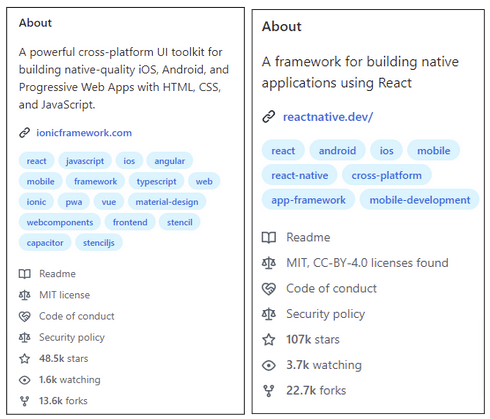
React Native is evidently more popular. It has more stars, more forks, and more people are watching it.
But data from AppBrain reveals that 3% of all apps are built using Ionic. The percentage for React Native is only 1.3%. Thus, while the latter is more popular, the former is more widely used. Now, developers have their own reasons for choosing either technology.
Ease of learning the language. Prior experience with similar technologies. The monetary benefits associated with the job. But as a business owner, it can get tough for you to pick one. Both Ionic and React Native have their pros. And they also aren’t without their fair share of downsides. So as someone who doesn’t speak fluent tech, how do you decide which one to choose for your mobile app development needs?
Do you just flip a coin and let the Lords decide it for you? No. Here is a detailed comparison for you to check out. No technical lingo. Just a simple comparison to help you decide what’s best for your business. Read on.
Before we get to the head-on comparison, let’s check out the basics of both cross-platform technologies.
Introduction to Ionic

Ionic is a cross-platform framework for building hybrid mobile apps with HTML, CSS, and JavaScript.
Key features of Ionic
The key features of Ionic as a cross-platform mobile app development technology include
- Based on AngularJS. It lets developers use web technologies that they are already familiar with for mobile app development.
- Uses Cordova or Capacitor to package the app into a native wrapper. It then provides access to native device features such as the camera and GPS.
- It is open source and free to use.
- Includes UI components designed to work across multiple platforms. Thus, developers can build apps with a consistent look and feel.
- Large and active community of developers who contribute to the project and provide support to users.
- Apps are as fast as native apps. This is especially so when Ionic is used with tools like Capacitor, which optimizes the app for each platform.
Introduction to React Native

React Native is a framework for building native mobile apps using JavaScript. It is based on the React JavaScript library, which was developed by Facebook.
Key features of React Native
- Uses JavaScript and the React library instead of using platform-specific languages such as Swift (for iOS) or Java (for Android).
- The apps are actually native apps. This means they are built using the same languages as the apps that come pre-installed on a device. This makes React Native apps feel more “native” to users, as they have the same look and feel as other apps on the device.
- It is open-source and free to use. And it is constantly being improved and updated by the community.
- Allows building reusable UI components, which can save time and effort when building an app.
- Supports hot reloading. It means that developers can make changes to the code and see the updates in real-time, without manually reloading the app.
- Large and active developer community, which means there is a wealth of resources and support available to developers who are using the framework.
Ionic vs. React Native – The complete comparison
Now that you are aware of the basics of Ionic and React Native, here’s a head-to-head comparison of Ionic vs. React Native.
Note: We have not just compared the core technical aspects. The comparison is from a business standpoint too. Thus, business owners with limited tech knowledge can also leverage this comparison for decision-making.
Parameter |
Ionic |
React Native |
Language |
HTML, CSS, Javascript | Only Javascript |
Execution |
Apps are executed in web view | Apps are compiled to native code and run directly on the device. |
Performance |
Good performance especially when used with Capacitor | Better performance as the apps run directly on the device |
User experience |
Web-like experience as the apps are rendered in web view | Native look and feel as apps are rendered natively |
Platform compatibility |
Compatible with the web as well which helps build hybrid apps | Compatible with mobile platforms and allows building native-like apps |
Learning curve |
Easier for developers with experience with Angular, HTML, CSS, and Javascript | Easier for developers who have worked with ReactJS before |
Community |
Active and flourishing community | More established and wider community |
Code reusability |
Offers a great degree of code reusability | Offers an even higher degree of code reusability as it allows creating reusable UI elements. |
Hot reloading |
Not supported | Supported |
Access to native features |
Allows access to native features with the use of Cordova or Capacitor | Allows direct access to native features through its APIs |
Development environment |
Uses a browser-based development environment | Requires setting up a native development environment on local machines. |
Debugging |
Browser-based debugger | Need to use platform-specific debuggers. (XCode for iOS and Android Studio for Android) |
Deployment |
Ionic apps can be deployed to the app stores or even the web | React Native apps can only be deployed to app stores. |
Customization |
Allows customizing the look and feel of their app using HTML and CSS | Provides a set of predefined UI components that can be customized using JavaScript |
Documentation |
Detailed and comprehensive documentation is available | The documentation is more detailed and up-to-date due to a bigger community of active users |
Third-party plugins |
A large ecosystem of third-party plugins | More options due to its larger developer community |
Pricing |
Open source and free but offers a paid version with additional features and support. | Just one version which is open-source and free to use |
App size |
Larger in size since they include the Cordova or Capacitor runtime, which is needed to access native device features. | Lightweight as compared to Ionic apps |
Updating |
Complex to update an app as it involves updating the Cordova or Capacitor runtime as well as the app code. | Easier to update the app as just the app code needs to be updated |
Platform-specific code |
Allows writing platform-specific code using a feature called Ionic Native | Does not allow writing platform-specific code |
Animation |
Relies on third-party libraries for in-app animation | Has built-in animation which allows creating smooth animations |
Styling |
Uses CSS for styling | Uses a combination of JavaScript and JSX for styling |
Based on what kind of resources you have available and your specific cross-platform mobile app development needs, you can pick either Ionic or React Native.
For quick decision-making, however, you can rely on the pointers below to decide between React Native and Ionic.
Use Ionic for mobile app development when
1. You want to build a hybrid app.
This can be useful if you want to build an app that can be accessed from a browser as well as from a mobile device.
2. You have web technology experts onboard
Ionic uses HTML, CSS, and JavaScript, so it may be a better choice if you have developers familiar with these technologies.
3. Need a customized look and feel for your app
Ionic allows customizing the look and feel of your app using HTML and CSS.
Use React Native for mobile app development when
1. You want to build a native app
React Native allows building a native app using the same languages as the apps that come pre-installed on a device. This can provide a better user experience.
2. You need the best performance
React Native apps are compiled to native code thus they generally have better performance.
3. You want to reuse code
If you hire a React Native developer, they can build reusable UI components, which can save time and effort when building an app.
4. You want hot reloading
React Native supports hot reloading, which lets developers see changes in the code in real-time.
Kick-starting your cross-platform app development project
With that, you now know the basics of React Native and Ionic, along with their features, differences, and most ideal use cases.
Don’t wait anymore. Hire a React Native developer or an Ionic developer today to kickstart your mobile app development project today!